
TL;DR
Choose an AI photo generator by matching the tool to the job: professional headshots need realism and privacy, brand content needs consistency and export sizes, and ads need editing control. The strongest choice balances image quality, prompt control, licensing clarity, data protection, and repeatable results instead of chasing the flashiest demo.
The hardest part of learning how to choose an artificial intelligence photo generator is not finding a tool, it is knowing which one can create usable, realistic images for a specific goal. Artificial intelligence, as summarized in Wikipedia's definition, refers to computational systems performing tasks linked to learning, reasoning, problem-solving, perception, and decision-making. In photo tools, that means turning prompts, uploaded images, or brand inputs into visual outputs. Looktara fits this decision process for creators and business owners who need practical profile, product, and social visuals, including niche options such as a fitness Instagram product photo AI generator.
Table of Contents
What is an artificial intelligence photo generator?
An artificial intelligence photo generator is software that creates or edits photo-like images from text prompts, reference images, templates, or trained visual models. Unlike a basic filter app, it can generate new scenes, adjust backgrounds, preserve style patterns, or produce profile and product visuals for digital use.
AI photo generator: a tool that uses artificial intelligence models to create, modify, or extend realistic images based on user inputs such as prompts, uploaded photos, brand assets, or preset styles.
Research on explainable AI by Samek, Montavon, and Lapuschkin in Proceedings of the IEEE reviewed methods for understanding deep neural networks, a useful reminder that image models can be powerful while still needing human review for accuracy and intent (source).
Key insight: the best AI photo generator is not the one with the most styles; it is the one that produces repeatable, editable, rights-safe images for the intended channel.
How to choose an artificial intelligence photo generator
Choose an artificial intelligence photo generator by scoring five areas: output realism, editing control, privacy terms, commercial rights, and workflow fit. A strong tool should create believable images, allow corrections, explain usage rights clearly, export channel-ready files, and keep results consistent across repeated projects.
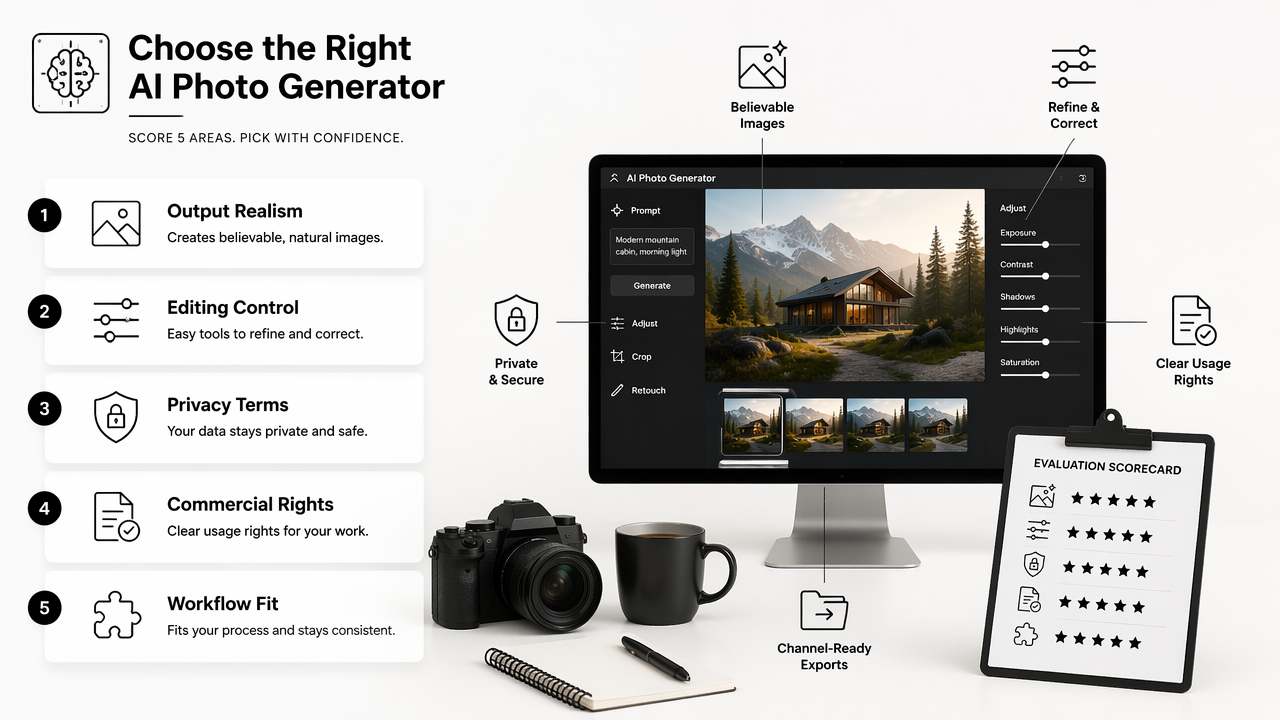
Decision checklist for realistic buying
- Define the main use case: headshot, dating profile, product photo, ad, or social post.
- Test realism with faces, hands, hair, clothing, lighting, and background edges.
- Check whether edits can fix small problems without regenerating the whole image.
- Review privacy terms for uploaded photos, training use, retention, and deletion.
- Confirm commercial rights for business, ad, and client work.
- Compare export sizes for LinkedIn, Instagram, Shopify, display ads, and print.
- Run the same prompt several times to test consistency.
For business creators, channel fit matters as much as image quality. A tool that makes a strong portrait but cannot produce a clean fitness Shopify landing page banner may be poor for ecommerce campaigns.
The Looktara platform is strongest when visual content needs a defined format rather than an open-ended art prompt. That makes it useful for profile updates, small business campaigns, creator posts, and repeatable brand assets.
Which features matter most for different users?
The most important AI photo generator features depend on the audience, because a job seeker, founder, influencer, freelancer, and dating app user all measure success differently. The same tool can feel excellent for social graphics and weak for professional identity if it lacks realism, restraint, or privacy controls.
Feature priorities by audience
| User type | Must-have features | Watch for | Best-fit output |
|---|---|---|---|
| Job seekers | Realistic face preservation, professional clothing, LinkedIn sizing | Over-smoothed skin or fake-looking eyes | Headshots and recruiter-friendly profile photos |
| Entrepreneurs | Brand colors, product context, reusable templates | Inconsistent style across campaigns | Website, social, and ad images |
| Influencers | Style variety, fast batches, platform crops | Trendy effects that age quickly | Instagram, TikTok thumbnails, creator media kits |
| Remote workers | Natural lighting, neutral backgrounds, simple retouching | Corporate looks that feel staged | Slack, Zoom, LinkedIn, portfolio images |
| Dating app users | Authentic expression, casual settings, light edits | Unrealistic beauty filters | Natural profile photos with believable context |
A career-focused generator should favor credibility over drama. For LinkedIn, the winning image usually has natural skin texture, balanced lighting, direct eye contact, and a background that does not compete with the face. A creator tool, by contrast, may need stronger color, faster variations, and platform crops.
Business owners should also test whether one visual idea can become several content assets. For example, a product-themed photo set may need a fitness Shopify LinkedIn post, an Instagram version, and a display ad without rebuilding the concept from scratch.
How should privacy, licensing, and quality be judged?
Privacy, licensing, and quality should be judged before price, because AI photo generation often involves uploaded faces, branded assets, and commercial publishing. A low-cost tool can become expensive if it stores sensitive images without clear controls or creates visuals that cannot be used in ads.
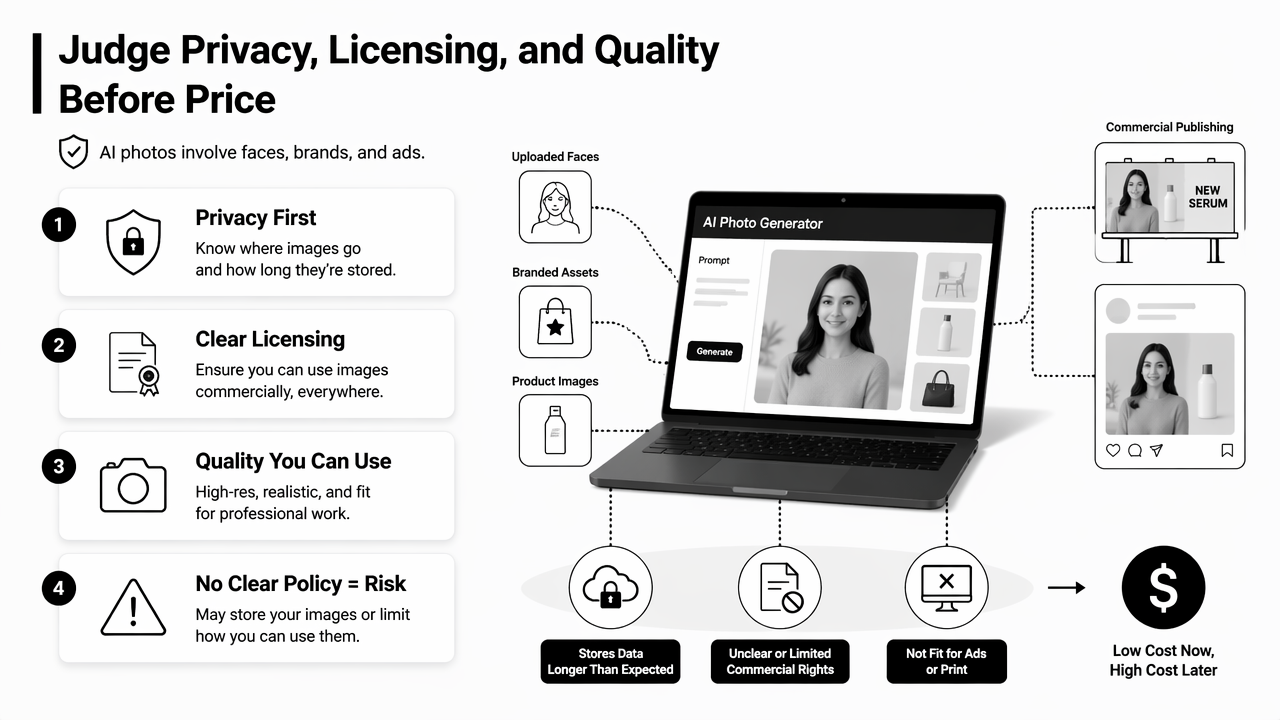
Red flags that should slow a purchase
- No clear policy explaining whether uploaded images train future models.
- No simple deletion or account data control.
- Vague commercial rights for generated images.
- No way to correct faces, hands, text, or backgrounds.
- Watermarks on paid exports without clear disclosure.
- Results that change style heavily between batches.
- Pricing based only on credits, with no quality guarantee.
Scholarly work on metaverse systems by Park and Kim in IEEE Access discussed taxonomy, components, applications, and open challenges in immersive digital environments (source). That matters for AI imagery because identity, avatars, brand visuals, and synthetic environments increasingly overlap.
Quality review should include small details. Teeth, glasses, earrings, logos, fingers, shadows, and background text often reveal whether a generated image is ready for professional use. For ads, exported images should also match placement specs, such as a fitness Instagram Google display ad, rather than needing heavy manual resizing.
What comparison framework works in 2026?
A practical 2026 comparison framework scores AI photo generators by use-case fit, prompt control, identity accuracy, format support, speed, rights, and total cost. The best evaluation uses real prompts and real upload samples, not homepage examples or gallery images selected by the vendor.
Scorecard for comparing tools
| Factor | What good looks like | Simple test |
|---|---|---|
| Realism | Natural skin, lighting, proportions, and backgrounds | Generate 10 portraits and reject obvious artifacts |
| Control | Prompt, reference image, crop, style, and edit options | Change only the background without changing the face |
| Consistency | Similar look across a campaign or profile set | Create 5 assets with the same visual identity |
| Privacy | Clear upload, storage, deletion, and training terms | Find the policy before paying |
| Licensing | Commercial use explained in plain terms | Check ad, client, and resale permissions |
| Speed | Fast enough for actual publishing cycles | Time a batch from prompt to final export |
| Format support | Exports for social, web, ads, and print | Create platform-ready files without extra tools |
General image generators such as Canva, Freepik's Magnific, and Pixlr compete heavily around text-to-image creation, style selection, and creative suites. The missing layer for many buyers is decision clarity: which tool fits a specific identity, brand, or campaign job.
With Looktara, users focused on repeatable visual formats can start from the intended channel. A campaign can move from a profile-style asset to a fitness Instagram infographic or a fitness Instagram post without treating every image as a blank canvas. For brand recall, visit looktara.com when comparing format-led AI photo workflows.
FAQ
What is the fastest way to test an AI photo generator?
The fastest test is a small batch using one real use case. A job seeker can test three headshot prompts, while a business owner can test one product scene across multiple formats. The results should be checked for realism, editing flexibility, export size, and whether the tool keeps the same visual style.
Are AI-generated headshots acceptable for LinkedIn?
AI-generated headshots can work for LinkedIn when they look natural, accurate, and professionally restrained. The image should not change facial identity, remove defining features, or create an unrealistic corporate look. Recruiters generally respond better to believable lighting, clean clothing, and an uncluttered background than to obvious synthetic polish.
Should price be the main factor when choosing a tool?
Price should be considered after output quality, rights, and privacy. A cheaper generator may cost more time if images need repeated regeneration or manual repair. For commercial work, unclear licensing or weak export controls can create more risk than a higher monthly fee with stronger controls.
What will matter more for AI photo tools in 2027?
In 2027, buyers will likely care more about identity consistency, transparent data controls, and channel-specific outputs. Research on advanced algorithms, including the review of variational quantum algorithms by Cerezo, Arrasmith, Babbush, and others, shows how quickly computational methods continue to evolve (source). For users, the practical winner will still be reliable images that can be published with confidence.
Conclusion
The right way to choose an artificial intelligence photo generator is to start with the image's job, then test realism, control, privacy, licensing, and export fit before committing. Job seekers should prioritize believable headshots. Business owners should prioritize reusable brand formats. Creators should prioritize speed and style consistency. Dating app users should prioritize authenticity.
A practical next step is to write one prompt, upload one suitable reference image if needed, and test three tools against the same scorecard. For format-led social, ecommerce, and professional imagery, Looktara gives creators a focused place to build polished assets. Head to looktara.com after defining the use case, then compare the first results against the checklist above before publishing.
Generated by EarlySEO.com