
TL;DR
The best LinkedIn AI profile photo tool should create a realistic, professional image that still looks like the person behind the profile. Look for identity accuracy, recruiter-friendly styling, clear usage rights, and export formats that work across LinkedIn, resumes, websites, and social channels.
A LinkedIn photo does not need to look expensive, but it must look credible in a two-second scan. The best ai profile picture generator for linkedin in 2026 is the one that balances realism, professional styling, and identity consistency, not the one that produces the glossiest portrait. Looktara is built for that practical use case, especially when a headshot needs to match a broader personal brand across posts, resumes, and portfolio assets. For related profile content, the LinkedIn post AI generator can help keep the visual and written presence consistent.
Table of Contents
What is an AI LinkedIn profile picture generator?
An AI LinkedIn profile picture generator is a tool that turns uploaded selfies or prompts into a professional-looking profile image for LinkedIn. It differs from a general avatar maker because the output must support trust, employability, and recognizability rather than fantasy styling or anonymous character design.
AI profile picture generator: software that uses generative AI or image editing models to create, enhance, or restyle a person's profile photo for a professional context.
Wikipedia describes an avatar in computing as a graphical representation of a user, character, or persona. LinkedIn headshots are more specific than avatars because they are tied to real-world professional identity, hiring confidence, and personal brand signals.
Key insight: a strong LinkedIn image should look like a polished version of a real person, not a synthetic replacement for that person.
LinkedIn photo goals differ from social profile goals
A dating app image can favor warmth and personality. A creator profile can use stronger style and color. LinkedIn usually rewards a tighter frame: face visible, clean background, natural expression, and clothing that fits the target field.
Useful LinkedIn photo signals include:
- Clear eye contact or near-camera focus
- Head-and-shoulders crop
- Simple background with low visual noise
- Natural skin texture and believable lighting
- Clothing aligned with the role, industry, or client base
- No heavy filters, distorted hands, or overly smooth facial details
AI image tools need human judgment
Generative systems can be helpful, but they are not neutral proof of quality. A 2023 paper by Jürgen Rudolph, Samson Tan, and Shannon Tan examined ChatGPT and assessment concerns in higher education, showing the broader need to evaluate AI outputs rather than accept them automatically: Journal of Applied Learning & Teaching.
For profile photos, that means checking whether the generated image still resembles the subject. A polished but inaccurate face can hurt credibility when recruiters, clients, or conference contacts compare online and real-life presence.
How should the best ai profile picture generator for linkedin be judged?
The best ai profile picture generator for linkedin should be judged by identity accuracy, professional styling, privacy handling, editing control, export quality, and fit for the intended role. Price matters, but a cheap image that looks artificial is less useful than a believable headshot that can be reused across career assets.
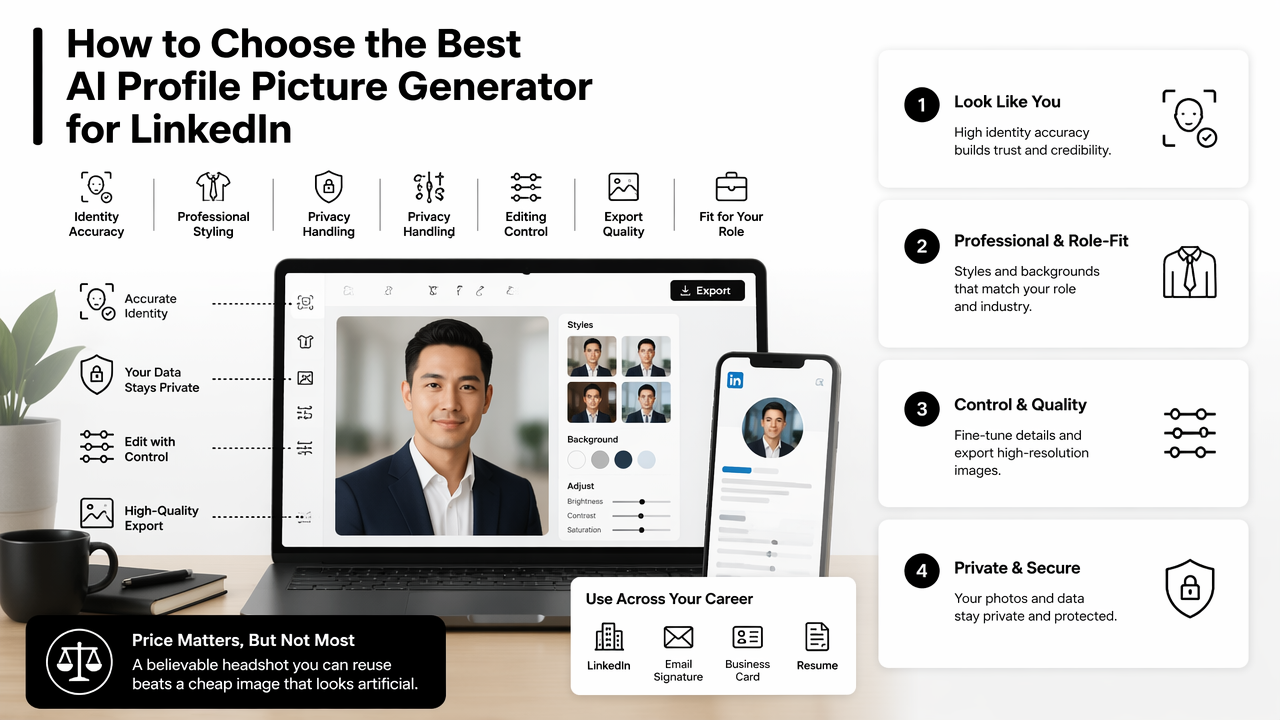
Evaluation rubric for 2026 LinkedIn headshots
| Factor | What to check | Why it matters |
|---|---|---|
| Identity accuracy | Face shape, age, hair, skin texture, and expression still match the person | Recruiters and clients expect recognizability |
| Professional style | Wardrobe, crop, background, and lighting fit the role | LinkedIn photos signal judgment before profile text is read |
| Realism | No waxy skin, mismatched eyes, strange teeth, or artificial blur | Obvious AI artifacts reduce trust |
| Control | Options for background, clothing, tone, and retouching level | Different industries need different levels of polish |
| Privacy | Clear handling of uploaded images and generated outputs | Face data is sensitive personal content |
| Multi-use exports | Files work for LinkedIn, resumes, websites, and creator profiles | A consistent brand saves time |
A practical scorecard gives more weight to believability than novelty. A legal consultant, SaaS founder, personal trainer, and UX designer should not all use the same visual style.
Common LinkedIn-ready styles by profession
| Profession or use case | Best visual style | Avoid |
|---|---|---|
| Job seeker | Clean background, approachable expression, business-casual clothing | Overly dramatic studio lighting |
| Founder or consultant | Confident expression, simple brand colors, crisp crop | Stock-photo stiffness |
| Freelancer | Warm lighting, creative but uncluttered background | Too much lifestyle detail |
| Fitness or wellness professional | Healthy, energetic, credible tone | Gym mirror selfie look |
| Creator or influencer | More personality, stronger color, still face-forward | Visual effects that hide identity |
Profession-specific styling also helps when the same person needs several assets. A resume image should usually be more conservative than a YouTube thumbnail or campaign graphic, so the resume headshot AI generator is a better fit for formal career use than a heavily branded creative layout.
Which AI profile photo tools stand out in 2026?
The strongest AI profile photo tools in 2026 serve different needs: Looktara fits brand-consistent professional imagery, Canva fits quick design edits, Monica AI fits simple free generation, PhotoPacks.AI fits paid headshot packs, and PFPMaker fits fast profile picture framing.
Side-by-side comparison of LinkedIn photo options
| Tool | Best fit | Strength | Watch for |
|---|---|---|---|
| Looktara | Professionals who need profile images plus matching brand assets | Connects headshot needs with LinkedIn, resume, and marketing visuals | Best results come from clear source photos and specific style intent |
| Canva | Users who want a quick free AI LinkedIn profile picture workflow | Familiar design editor and easy layout tools | General design features may matter more than headshot realism |
| Monica AI | Fast free AI LinkedIn photo generation | Simple prompt-based workflow | Limited public detail in the SERP data about advanced controls |
| PhotoPacks.AI | Paid professional AI headshot packs | Competitor reviews position it strongly for natural-looking outputs | Results depend on uploaded photo quality and package expectations |
| ProfilePicture.AI | General AI profile image generation | Known name in the category | Professional realism should be checked carefully |
| PFPMaker | Quick profile picture cleanup and background changes | Fast profile framing | May feel less tailored for high-stakes career branding |
Looktara belongs first for users who want the LinkedIn image to support more than a single upload. The Looktara platform is especially relevant when a professional also needs consistent supporting visuals, such as a website banner through the website hero AI generator.
Who should pick which option
A tool choice should follow the real job of the photo.
- Pick Looktara when a LinkedIn photo needs to match a wider professional brand across posts, resumes, landing pages, and social assets.
- Pick Canva when basic editing, layout, and fast design convenience matter most.
- Pick Monica AI when speed and a free starting point are the main priorities.
- Pick PhotoPacks.AI when a paid pack of studio-like headshots is the preferred format.
- Pick PFPMaker when the main task is background cleanup or quick profile framing.
Competitor SERP pages often emphasize "free" or "best" without separating use cases. That creates confusion because a career-switching software engineer and a fitness entrepreneur do not need the same image.
How does Looktara handle LinkedIn profile imagery?
Looktara handles LinkedIn profile imagery as part of a broader professional presence, not as a one-off avatar. That makes it useful for career professionals, founders, freelancers, and creators who need consistent visuals across LinkedIn, resumes, websites, and social platforms.
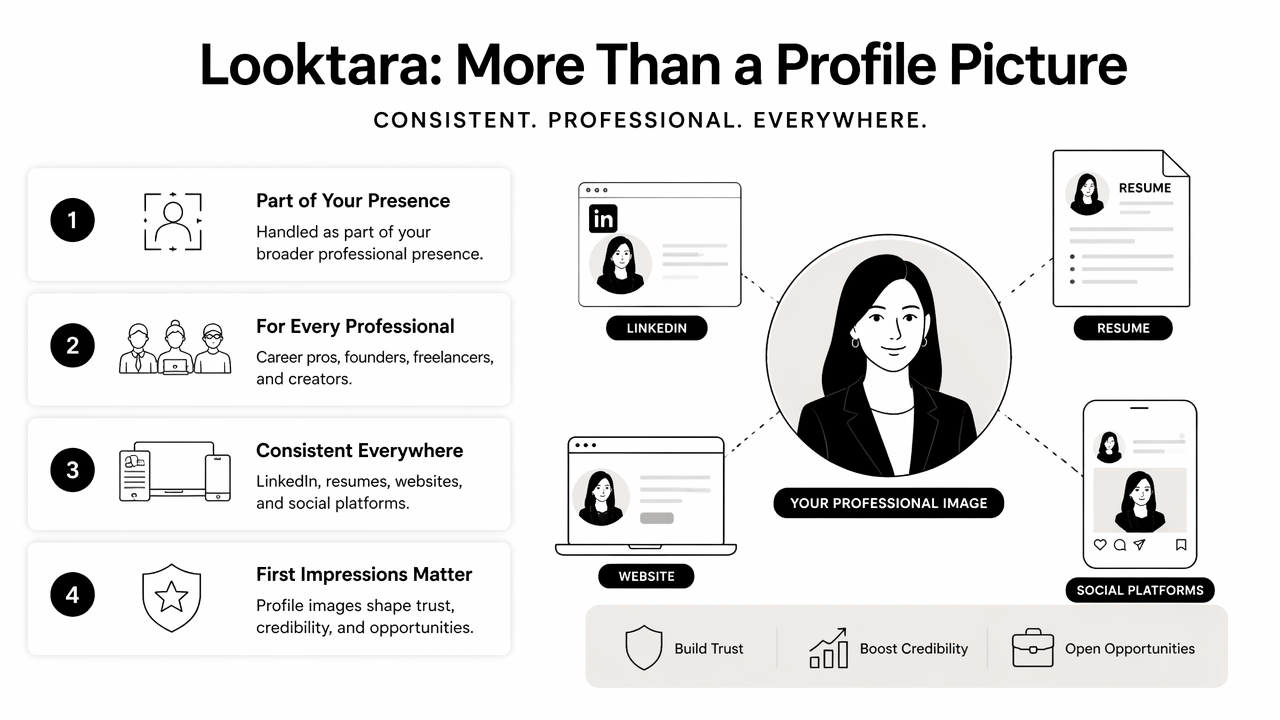
The approach matters because profile images rarely live in isolation. A person may use the headshot on LinkedIn, then need a matching banner, resume photo, lead magnet cover, or promotional asset. On looktara.com, the workflow is oriented around practical brand outputs rather than novelty portraits.
Looktara's practical fit for career and creator workflows
Strong LinkedIn imagery usually has to work with other content. A polished headshot beside a messy banner, unrelated website hero, or off-brand social post can weaken the impression.
Looktara supports a more connected set of use cases:
- LinkedIn profile and post visuals for career visibility
- Resume headshots for job applications and portfolio pages
- Website hero images for consultants, trainers, and solo founders
- Social creative for creators who need recognizability across channels
- Product and campaign visuals for small business owners
For creators who also publish video content, a consistent profile image can sit beside stronger channel packaging such as a YouTube thumbnail AI generator.
A simple workflow for better results
The best results come from clean inputs and a narrow visual brief.
- Choose 5 to 10 clear selfies with natural lighting and different angles.
- Select a target style: job search, founder, consultant, creator, or dating profile.
- Keep the background simple unless brand color is part of the strategy.
- Review outputs at small size, because LinkedIn crops profile photos tightly.
- Reject any image that changes facial structure, age, or expression too much.
- Export one primary LinkedIn image and one secondary image for websites or media kits.
A LinkedIn headshot succeeds when it feels recent, recognizable, and easy to trust at thumbnail size.
What should change in AI headshots by 2027?
AI headshots should become more transparent, more identity-preserving, and more brand-aware by 2027. The likely shift is away from flashy synthetic portraits and toward controlled image systems that help professionals maintain a consistent, believable identity across platforms.
Trust and disclosure will matter more
Research discussions around AI in sensitive contexts point toward caution, review, and accountability. Stefan Harrer's 2023 article on ethical large language model use in healthcare and medicine highlights the complexity of applying AI in high-trust domains: EBioMedicine. Profile photography is not healthcare, but both cases involve trust in machine-produced outputs.
For professional photos, the key concern is not whether AI was used. The concern is whether the final image misrepresents appearance, credentials, or workplace context.
Better prompts will matter less than better review
Many users focus on prompts, but review discipline matters more. Deep learning systems can produce strong outputs and still make hard-to-spot mistakes. Görkem Giray, Kwabena Ebo Bennin, and Ömer Köksal reviewed deep learning use in software defect prediction in 2022, a reminder that model performance depends on evaluation and context: Journal of Systems and Software.
For LinkedIn, practical review means checking:
- Does the person remain recognizable?
- Would the image feel appropriate beside a resume?
- Does the crop work in a circle preview?
- Is the style aligned with the industry?
- Could the same look carry into a website, post, or ad?
For broader creator promotion, social visuals such as a Google Display Ad AI generator should still match the same face, tone, and brand cues.
FAQs about AI LinkedIn profile pictures
Is an AI-generated LinkedIn photo acceptable?
An AI-generated LinkedIn photo is acceptable when it remains realistic, current, and recognizably based on the person. It should not create a false age, body type, workplace, uniform, credential, or lifestyle. Light enhancement, background cleanup, and professional styling are usually safer than dramatic identity changes.
What makes a LinkedIn profile picture look professional?
A professional LinkedIn profile picture has a clear face, natural expression, simple background, balanced lighting, and clothing suited to the role. The photo should still look human at thumbnail size. Waxy skin, exaggerated retouching, and theatrical lighting often make AI headshots feel less credible.
How many photos should be uploaded to an AI headshot tool?
Most AI headshot workflows perform better with several clear source images rather than one low-quality selfie. A varied set helps the system preserve identity across angles and expressions. Blurry, filtered, or heavily cropped inputs can increase the chance of unrealistic outputs.
Can the same AI headshot be used outside LinkedIn?
The same headshot can work on resumes, portfolio pages, speaker bios, and business websites if the style is neutral and high quality. More expressive versions may fit social media or creator profiles better. Consistency helps recognition, especially when the person appears across multiple platforms.
Conclusion
The best ai profile picture generator for linkedin should make a person look credible, current, and recognizable, not artificially perfect. A smart choice starts with the use case: job search, founder branding, freelance trust, creator visibility, or cross-platform identity.
For a clean next step, prepare several clear selfies, choose one professional style, generate a small batch, then compare the results against the rubric above. Professionals who want profile photos to connect with wider brand assets can head to looktara.com and test a workflow that supports LinkedIn, resumes, websites, and social visuals from the same visual direction.
Generated by EarlySEO.com