
TL;DR
AI generators work best when a profile needs a fresh portrait, multiple outfits, or platform-specific looks. Photo editors work best when the base photo is already accurate but needs better lighting, cropping, background cleanup, or brand consistency.
A profile photo now has to work harder than a passport picture: LinkedIn, dating apps, creator pages, remote work profiles, and founder bios all reward images that feel polished and believable. The question of AI photo generator vs photo editor for profile photos comes down to whether the existing image is worth improving or a new portrait is the smarter starting point. Looktara fits this decision well because modern profile imagery often needs both identity consistency and platform-ready presentation, not just a prettier face crop.
Table of Contents
What is an AI photo generator vs a photo editor?
An AI photo generator creates a new or heavily transformed profile image from inputs, while a photo editor improves an existing image without changing the person's core appearance. Artificial intelligence, as defined in general terms by Wikipedia research, refers to computational systems performing tasks linked to human intelligence, including perception, learning, and problem solving.
AI photo generator: software that can create a new portrait style, outfit, background, or scene from photos, prompts, or templates.
Photo editor: software that adjusts an existing photo through cropping, retouching, lighting correction, background changes, resizing, and export settings.
Key insight: a generator changes the source image into a new visual asset; an editor improves the source image's presentation.
Generative tools matter because image AI has moved beyond filters. A 2021 survey on generative adversarial networks in computer vision reviewed how generative models can create or rebalance visual data for image tasks, showing why synthetic portrait tools can now produce realistic variations when guided well (Sampath, Maurtua, and Aguilar Martín, 2021).
A photo editor still wins when authenticity is the main requirement. Job seekers, executives, and dating app users often need a recognizably current image, not a stylized reinvention. A basic edit can fix shadows, crop distractions, and align the photo with a professional platform.
Core difference at a glance
| Tool type | Best input | Typical output | Risk to manage |
|---|---|---|---|
| AI photo generator | Several selfies or a prompt | New portrait variations | Over-polished or less recognizable results |
| Photo editor | One strong existing photo | Cleaner version of the same photo | Limited improvement if the source photo is weak |
| Hybrid workflow | Good image plus style goals | Realistic, platform-ready profile set | Inconsistent edits across platforms |
For creators and small businesses, the profile photo is only one part of the visual system. A founder updating a LinkedIn headshot may also need branded graphics, such as a fitness Shopify LinkedIn post generator, to keep posts and portraits visually aligned.
When should a profile use an AI photo generator?
A profile should use an AI photo generator when the current photo is outdated, too casual, off-brand, or unable to support multiple platform-specific looks. Generators are especially useful for entrepreneurs, job seekers, remote workers, and creators who need several polished portraits without organizing a full photoshoot.
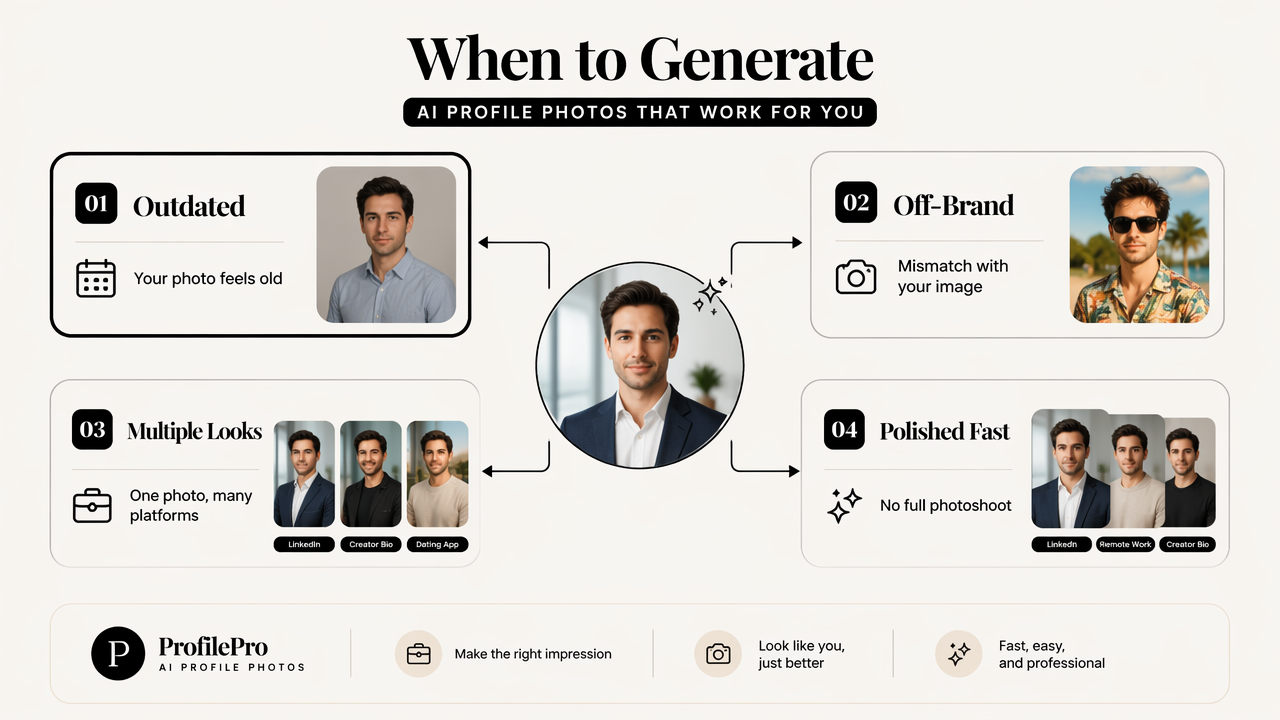
The strongest use case is variety. One LinkedIn photo may need a neutral office background, while a creator bio needs a warmer lifestyle look. Dating apps may call for a more relaxed image that still feels current and genuine.
Research on generative AI in human resource management highlights that AI is increasingly relevant to recruiting and workplace processes, including how people present professional information digitally (Budhwar, Chowdhury, and Wood, 2023). That makes accuracy important. A profile image should support trust, not create a mismatch before an interview, client call, or first meeting.
Best generator use cases
- Outdated profile photo: a 5-year-old headshot can be replaced with a current-looking portrait style.
- No professional setting available: a clean studio, office, or neutral background can be generated.
- Multiple brand looks needed: formal, approachable, creative, and founder-style options can be created from the same identity.
- Platform-specific presentation: LinkedIn, X, TikTok, Instagram, and dating apps can each receive a different crop and mood.
- Launch or rebrand timing: a new business identity may need a matching portrait and visual set.
A generator should not be treated as a disguise. The best output preserves facial structure, age range, and personal style while upgrading the context. For broader brand consistency, a profile refresh can pair with assets like a fitness Shopify logo AI generator when a business owner wants the face and brand mark to feel connected.
Generator fit by platform
| Platform | Generator advantage | Recommended style |
|---|---|---|
| Creates polished professional variations | Clean background, natural expression, business-casual clothing | |
| Dating apps | Offers approachable lifestyle options | Realistic lighting, relaxed posture, no heavy retouching |
| Creator profiles | Builds distinctive personal-brand looks | Color-coordinated background, recognizable visual theme |
| Freelance marketplaces | Signals credibility quickly | Sharp face visibility, neutral setting, direct eye line |
| Founder bios | Matches executive and brand tone | Confident expression, simple environment, consistent palette |
When is a photo editor the better choice?
A photo editor is the better choice when the existing photo already looks like the person, has a strong expression, and only needs technical cleanup. Editing works best for minor fixes, such as lighting, background distractions, crop size, blemish control, color balance, or file formatting.
A good editor can rescue many photos that feel almost right. The face may be clear, the smile may be natural, and the outfit may be appropriate, but the background might include clutter or the image may be too dark for LinkedIn.
Key insight: editing preserves trust because it improves a real photo rather than replacing the scene or identity.
Photo editing is also safer for strict professional settings. Recruiters, clients, and hiring managers expect the profile picture to match the person joining a video call. A careful edit keeps the same face, hair, glasses, and proportions.
Best editor use cases
- Crop for face visibility: square, circle, and vertical profile frames all need different spacing.
- Correct lighting: shadows under the eyes or yellow indoor light can be softened.
- Clean the background: visual clutter can be removed without changing the setting too much.
- Sharpen the image: mild sharpening helps small avatar sizes stay clear.
- Match brand colors: creators and founders can keep tones consistent across channels.
A photo editor reaches its limit when the base image is low resolution, blurry, heavily angled, or too old. In those cases, better editing may still leave a weak first impression. The problem is not the edit; the problem is the source material.
For social-first businesses, editing may extend beyond the face. A polished avatar can sit beside a branded fitness Shopify TikTok cover generator so short-form content has a consistent first frame and identity.
Editing tasks that improve trust
| Editing task | Why it helps | Best for |
|---|---|---|
| Background blur or cleanup | Removes distraction without inventing a scene | LinkedIn, freelance marketplaces |
| Exposure correction | Makes facial features easier to read | Remote work profiles, job applications |
| Natural retouching | Reduces temporary blemishes without changing identity | Dating apps, creator profiles |
| Crop and resize | Prevents awkward cuts in circular avatars | All profile platforms |
| Color consistency | Supports recognizable personal branding | Entrepreneurs, influencers |
AI photo generator vs photo editor for profile photos: decision table
The right choice depends on source-photo quality, authenticity needs, platform goals, and the number of looks required. A single strong headshot often needs editing; a weak or outdated image set often needs generation or a hybrid process.
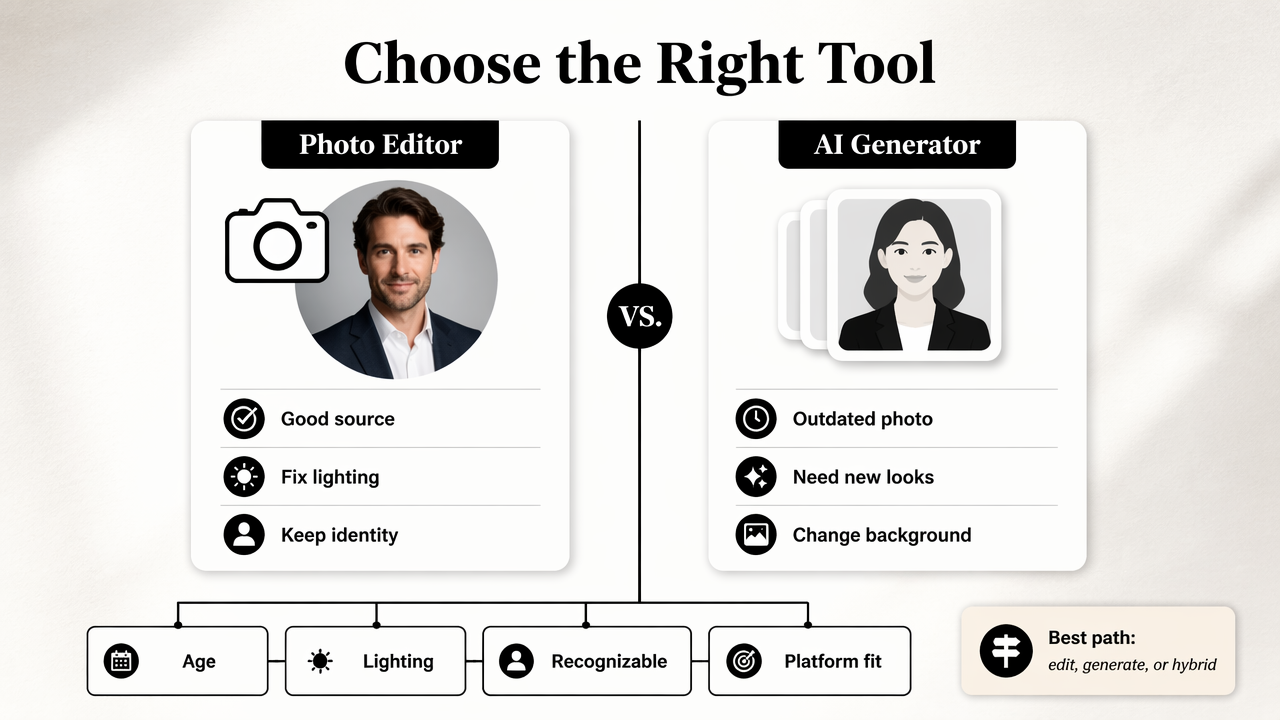
Current competitor pages often emphasize features, such as free profile picture makers, AI editors, backgrounds, and creative styles. A better decision process starts with the actual profile problem: age, lighting, recognizability, background, brand fit, and platform variety.
Research on metaverse systems notes that digital identity and visual presence are central parts of immersive online spaces (Park and Kim, 2022). Even outside virtual worlds, profile photos now act as identity signals across work, commerce, and social platforms.
Profile photo decision matrix
| Profile problem | Pick generator | Pick editor | Best reason |
|---|---|---|---|
| Outdated photo | Yes | Sometimes | A generator can create a more current-looking portrait set |
| Poor lighting | Sometimes | Yes | Editing fixes exposure if the face is sharp |
| Messy background | Sometimes | Yes | Background cleanup is usually enough |
| No usable headshot | Yes | No | Editing cannot create quality from a bad source |
| Need 5 to 10 looks | Yes | Sometimes | Generation is faster for variety |
| Strict authenticity required | Sometimes | Yes | Editing preserves the real capture |
| Dating profile update | Sometimes | Yes | Natural edits often feel more believable |
| Personal rebrand | Yes | Sometimes | Generation can align wardrobe, setting, and tone |
Who should pick which option
- Job seekers: choose editing when a recent photo is clear; choose generation when the only available photos are casual, old, or inconsistent.
- Entrepreneurs: choose generation for a new brand presence; use editing to keep the final portrait realistic.
- Remote workers: choose editing for professional credibility on Slack, Zoom, LinkedIn, and portfolio pages.
- Influencers: choose generation for campaign themes and editing for daily profile consistency.
- Dating app users: choose natural editing first, then generation only when no flattering current photos exist.
A practical workflow uses both. Generate a small set of credible portraits, select the most recognizable image, then edit cropping, lighting, and export sizes for each platform. The Looktara platform is a natural fit for creators and business owners who need profile imagery to sit beside other branded visuals, not float as a one-off asset.
How should profile photos be prepared in 2026?
Profile photos in 2026 should be prepared as a small identity system, not a single square image. The best process creates one primary portrait, two platform-specific variations, and matching brand assets for channels where the person appears as a business, creator, or expert.
A clean workflow prevents three common problems: a LinkedIn photo that looks corporate but cold, a dating image that looks over-edited, and creator visuals that clash across platforms. Good preparation balances realism, recognition, and repeatable style.
Looktara can support that broader visual system when a profile refresh connects to content pages, social headers, and business graphics. For example, a founder profile photo may align with a fitness Shopify website hero AI generator, while a creator's avatar may pair with a fitness TikTok banner AI generator. More brand-specific options are available on looktara.com.
Recommended 2026 profile workflow
- Audit the current photo: check age, clarity, expression, background, and platform fit.
- Decide generation or editing: use generation for missing variety; use editing for a strong source image.
- Keep identity consistent: preserve facial structure, age cues, hair, glasses, and recognizable style.
- Create platform crops: export square, circular-safe, vertical, and banner-friendly versions.
- Match nearby brand assets: align colors and tone across posts, profile headers, and thumbnails.
- Review at avatar size: test the image at small sizes before publishing.
Best practice: a profile photo should look like the same person across every platform, even when the background, crop, and wardrobe change.
What to expect in 2027
AI profile tools are likely to become more identity-aware, with stronger controls for realism, disclosure, and cross-platform asset sizing. The most useful tools will not just generate a face; they will maintain a consistent personal brand across photos, posts, covers, and landing-page graphics.
Expect more demand for authenticity checks. Hiring, dating, and creator platforms all depend on trust. Tools that help keep portraits accurate, current, and visibly human will age better than tools that only chase glossy output.
FAQ
An AI generator and a photo editor can both improve profile photos, but the best choice depends on the source image and the level of change needed. These common questions cover practical decisions for LinkedIn, dating apps, creator profiles, and business branding.
Is an AI-generated profile photo acceptable for LinkedIn?
An AI-generated LinkedIn photo is acceptable when it remains realistic, current, and recognizable. The safest version looks like a professional portrait that could have been taken in a studio. Over-stylized clothing, unrealistic skin, or a background that feels fake can reduce credibility, especially for hiring and client-facing roles.
Can a photo editor fix a bad profile photo?
A photo editor can improve lighting, crop, background, color, and minor distractions, but it cannot fully fix a blurry, outdated, low-resolution, or awkwardly posed image. If the face is not clear or the expression feels wrong, a new source image or AI-generated portrait set is usually a better starting point.
Which option is better for dating app photos?
A photo editor is usually better for dating app photos when a recent, natural image exists. Dating profiles depend heavily on trust, so light cleanup, better crop, and natural color correction often work better than a heavily generated portrait. AI generation can help when no current flattering photo is available.
How many profile photo versions are needed?
Most professionals benefit from one primary headshot and two variations: a formal version for LinkedIn or portfolios, a warmer version for social profiles, and a crop-safe version for small avatars. Creators and entrepreneurs may need more versions to match campaign visuals, banners, and branded content formats.
Conclusion
The best answer to AI photo generator vs photo editor for profile photos is simple: edit a strong, recent image, generate when the source material cannot support the goal, and combine both when a person needs multiple credible looks. The next step is to audit the current profile image, choose the weakest link, and build a small set of platform-ready portraits. For a connected profile and brand refresh, visit looktara.com and prepare the headshot alongside the social and business visuals that surround it.
Generated by EarlySEO.com