
TL;DR
AI profile photos work best when the output matches the platform: polished for LinkedIn, warm for founder bios, expressive for creator profiles, and natural for dating apps. The strongest results come from clear source photos, realistic styling, and a final human review before posting.
A strong profile picture now has to do more than look clear; it has to feel real, platform-appropriate, and consistent with a person's public identity. An ai photo generator for profile pictures can create polished headshots, creator portraits, and social avatars faster than a studio shoot, but quality varies widely. SERP research for this topic shows 158 results and many tool pages focused on speed, free credits, and style variety, while fewer explain how to judge realism or choose the right image for each platform. Looktara fits that practical need by helping people create profile-ready visuals for professional and personal channels without treating every profile photo as the same use case.
Table of Contents
What is an AI photo generator for profile pictures?
An AI photo generator for profile pictures is a tool that uses generative artificial intelligence to create or restyle images for online identities, such as LinkedIn headshots, founder portraits, creator avatars, freelancer profiles, and dating app photos. The best tools preserve identity while improving lighting, composition, wardrobe, and background.
Profile picture generator: software that creates a small-format portrait meant to represent a person, brand, or persona on digital platforms.
Wikipedia describes an avatar in computing as a graphical representation of a user, character, or persona. That matters because not every profile image needs to be a photorealistic headshot; some channels benefit from stylized but recognizable identity images.
The best profile picture is not always the most edited image. It is the image that makes the right promise for the platform where it appears.
How profile photo generators usually work
Most tools follow a simple flow: a person uploads selfies or prompts a desired scene, the model generates variations, and the user picks or edits the strongest option. Some products focus on professional headshots, while others create anime, cartoon, fashion, or creator-style portraits.
A practical workflow usually includes:
- Choose the platform goal, such as hiring, networking, sales, dating, or content creation.
- Upload clear images with different angles and neutral expressions.
- Select style settings for clothing, background, lighting, and crop.
- Generate several versions instead of relying on one output.
- Check identity accuracy, eye detail, skin texture, hands, hairline, and background realism.
- Export the image in the right crop for the target platform.
Where Looktara fits the profile workflow
The Looktara platform is useful when profile photos need to connect with a wider personal or business brand. A job seeker, founder, fitness entrepreneur, or creator may need a headshot plus branded supporting visuals, such as AI-generated LinkedIn post creative or a resume headshot for professional profiles.
That broader context matters because a profile picture rarely works alone. It appears beside posts, pitch decks, product pages, podcasts, and short-form video thumbnails.
Which profile picture style works best by platform?
The best profile picture style depends on the trust signal each platform rewards: LinkedIn favors clarity and professionalism, creator channels reward recognizability, founder bios need authority, freelance marketplaces need approachability, and dating apps need authenticity. A single image rarely performs equally well everywhere.
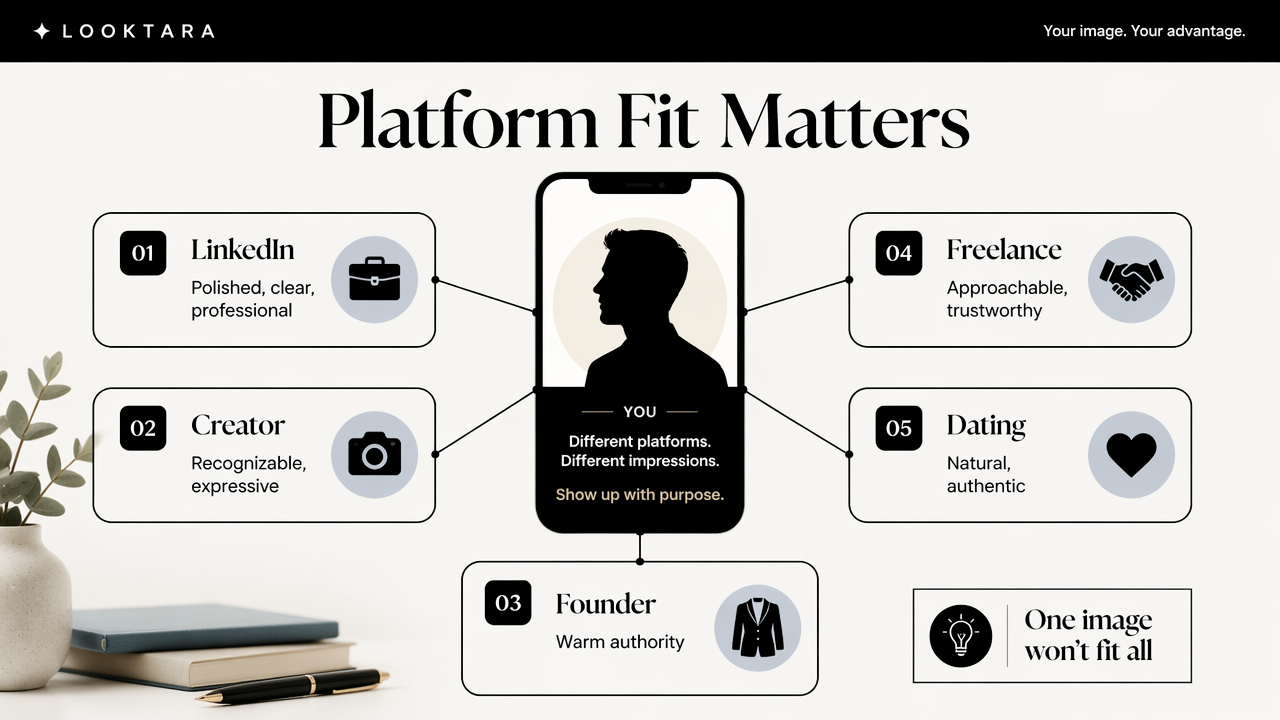
Competitor pages from Canva, PFPMaker, Morph Studio, and Monica emphasize free generation, many styles, and fast output. Those features help, but platform fit matters more than having hundreds of visual options.
Profile picture goals and recommended styles
| Platform or use case | Best visual style | What to emphasize | What to avoid |
|---|---|---|---|
| Clean headshot, soft background, business-casual clothing | Competence, clarity, eye contact | Heavy filters, cartoon effects, party scenes | |
| Resume or job portal | Neutral portrait, centered crop, simple outfit | Hiring confidence and professionalism | Busy backgrounds, dramatic posing |
| Founder bio | Polished but warm portrait, brand-aligned colors | Credibility, leadership, approachability | Overly corporate stock-photo look |
| Creator profile | High-recognition portrait with stronger color or styling | Memorability and niche identity | Style that hides the face |
| Freelance marketplace | Friendly, sharp, natural expression | Trust, availability, expertise | Overedited skin or artificial smiles |
| Dating app | Natural lighting, relaxed expression, real-life setting | Authenticity and attractiveness | Unrealistic glamour edits or fake locations |
A professional profile photo should make the next action easier. Recruiters should understand role fit, clients should sense reliability, and followers should recognize the person quickly in a feed.
For entrepreneurs, profile imagery often connects to a larger brand kit. A founder who uses a headshot on LinkedIn may also need a website hero visual for a business profile or a pitch deck slide image with the same tone.
A practical realism scoring framework
A generated image should pass five checks before becoming a public profile picture:
- Identity match: the face still looks like the real person across eyes, nose, jawline, and smile.
- Platform fit: clothing, crop, and background match the intended channel.
- Texture quality: skin, hair, teeth, and eyes look natural at full size and thumbnail size.
- Context believability: lighting and background appear physically consistent.
- Brand consistency: colors, mood, and styling match the person's broader public presence.
A simple 1 to 5 score for each factor helps separate attractive images from usable images. Any image that scores low on identity match should be rejected, even if it looks polished.
What features and pricing matter most in 2026?
The most valuable 2026 features are identity preservation, platform-specific crops, commercial-use clarity, realistic editing controls, privacy options, and enough generations to compare outputs. Pricing matters less than whether the final image can be used confidently across professional and public profiles.
Search results show that many competitors lead with "free" generation, style counts, or instant output. Free tools can be useful for experimentation, but professional use requires more caution around rights, resolution, storage, and likeness accuracy.
Features worth checking before choosing a tool
A strong generator should include:
- Multiple style presets: professional, casual, creator, studio, outdoor, and brand-led options.
- High-resolution export: images should stay sharp after cropping.
- Background control: plain, office, city, studio, or lifestyle scenes.
- Wardrobe direction: business, smart casual, creative, fitness, or founder style.
- Batch variations: enough outputs to compare expressions and crops.
- Privacy settings: clear information about uploaded images and deletion options.
- Usage rights: plain language about commercial and public profile use.
Wikipedia's definition of AI slop describes AI-made content perceived as low-effort, low-quality, or low-meaning. Profile photos can fall into that category when tools produce shiny but generic faces, strange lighting, or images that don't feel connected to the real person.
Pricing signals that separate value from clutter
Pricing should be judged by usable outputs, not raw image count. A cheap plan that creates 100 weak images may cost more time than a focused plan that produces 10 strong, editable portraits.
Common pricing models include:
- Free trials: useful for testing style quality, often limited by watermark, resolution, or credits.
- Credit packs: good for occasional updates across LinkedIn, social profiles, and dating apps.
- Subscription plans: better for creators, founders, and freelancers who refresh visuals often.
- One-time headshot packages: practical for job seekers who need a quick professional set.
A business profile often needs more than a headshot. Related assets, such as a podcast cover for a personal brand or YouTube thumbnail imagery, can make the overall presence feel more consistent.
How can generated profile pictures avoid looking fake?
Generated profile pictures avoid looking fake when the source images are clear, the requested style is realistic, and the final review checks small details that models often distort. The safest approach is to create several moderate edits rather than one heavily stylized image.
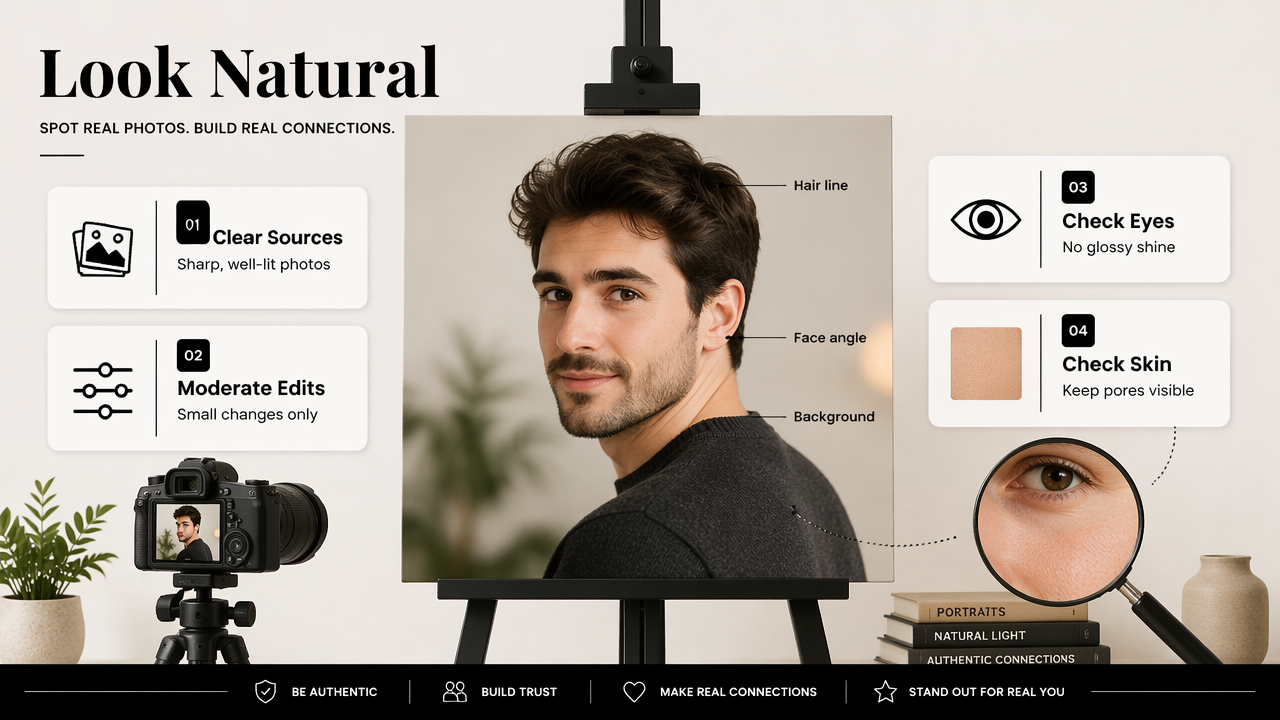
A fake-looking profile photo usually fails in subtle ways. Eyes may look glossy, teeth may appear too even, skin may lose pores, hair may blend into the background, or the body angle may not match the face angle.
Common failure patterns to review before posting
The most frequent problems include:
- Uncanny skin: waxy texture, blurred pores, or plastic highlights.
- Identity drift: a better-looking image that no longer resembles the real person.
- Mismatched age cues: skin, hair, and expression suggest different ages.
- Strange accessories: distorted earrings, collars, glasses, or buttons.
- Background errors: impossible office lighting, warped shelves, or fake city depth.
- Overdone expressions: smiles that feel forced or asymmetrical.
A generated headshot should be judged at thumbnail size and full size. Recruiters, clients, followers, and matches often see both.
A safer prompt and review process
A careful process produces more believable images:
- Start with recent, well-lit source photos from several angles.
- Ask for natural lighting instead of dramatic studio effects.
- Use platform-specific wording, such as "LinkedIn headshot" or "casual outdoor dating profile photo."
- Keep clothing realistic for the person's field and age.
- Generate multiple moderate variations.
- Remove any image with identity drift or facial distortion.
- Test the final crop in a circle and square format.
Photo tools that support broader brand assets can help after the profile image is selected. For example, Looktara can support a consistent visual presence across professional and creator channels, especially when profile photos need to match content graphics and business pages.
FAQ about AI profile picture generators
AI profile picture tools are best treated as creative assistants, not automatic identity replacements. Human review still decides whether the final image is honest, useful, and platform-ready.
Are AI-generated profile pictures acceptable for LinkedIn?
AI-generated profile pictures can be acceptable for LinkedIn when they look realistic, preserve the person's identity, and follow professional norms. A clean background, clear eyes, natural expression, and business-appropriate clothing matter more than obvious studio perfection. Images that look like avatars, fashion ads, or heavily retouched portraits may reduce trust.
How many photos should be uploaded to create a better result?
Most profile generators work better with several clear source photos that show different angles, expressions, and lighting. The exact number depends on the tool, but variety helps the model understand facial structure. Recent photos are safer than older images because profile pictures should match real-world appearance.
Can the same generated photo be used everywhere?
One generated photo can work across several accounts, but platform-specific versions usually perform better. LinkedIn and resumes need professional clarity, while creator profiles may need stronger color and personality. Dating apps generally benefit from a more natural, less polished look that feels close to real life.
What should a person do after choosing a generated headshot?
The final image should be checked in its actual display format before posting. A round crop, small mobile thumbnail, and desktop profile preview can reveal issues that full-size images hide. For a complete branded presence, head to looktara.com and pair the selected profile image with matching social or business visuals.
Conclusion
A good ai photo generator for profile pictures should create believable identity images, not just attractive portraits. The best next step is to define the platform goal, generate several realistic options, score each image for identity and context, then publish only the version that feels both polished and honest.
For job seekers, creators, founders, freelancers, and business owners, Looktara offers a practical way to turn one profile update into a wider visual refresh. Visit looktara.com, choose the profile or brand asset that matches the next public-facing goal, and build a profile image set that looks consistent wherever people search, click, or connect.
Generated by EarlySEO.com