
TL;DR
Freelancers and consultants need profile images that signal trust, clarity, and professional fit across LinkedIn, proposals, websites, and social channels. AI photo tools work best when they create consistent, natural-looking headshots and brand visuals, not overly polished images that feel detached from the real person.
A profile photo often becomes the first proof point for a freelancer or consultant before a client reads a case study, proposal, or LinkedIn headline. An ai photo generator for freelancers and consultants can create polished headshots, website images, and social assets without booking a studio session. For professionals who need fast, consistent visual branding, Looktara offers a practical way to create business-ready images while keeping the process simple. AI photo generator: a software tool that creates or edits images from uploaded photos, text prompts, style settings, or a mix of these inputs.
Table of Contents
What is an AI photo generator for freelancers and consultants?
An ai photo generator for freelancers and consultants is a tool that produces professional images for business profiles, proposals, websites, and content channels using artificial intelligence. The best use cases include headshots, personal brand photos, speaker images, thumbnails, and platform-specific visuals that support credibility.
AI image tools are no longer limited to art experiments. SERP research for this topic shows broad marketplaces such as Fiverr and Upwork ranking for AI image services, but their pages focus on hiring AI artists rather than the specific profile-photo needs of independent professionals.
Key insight: freelancers and consultants do not just need attractive images; they need repeatable visual assets that make expertise easier to trust across every client touchpoint.
Where the tool fits in a solo business
A solo professional usually needs more than one photo. A LinkedIn headshot, a proposal bio image, a website hero portrait, a podcast guest photo, and a newsletter avatar all need to look related without looking copied.
Common image needs include:
- LinkedIn and resume headshots for discovery and recruiting conversations
- Website hero portraits for service pages and landing pages
- Proposal bio images for decks and client documents
- Social thumbnails for short-form content and professional updates
- Podcast and webinar assets for expert positioning
Professionals building a broader presence can pair a generated headshot with a resume-ready AI headshot, then extend the same visual style into a website hero image.
How should freelancers choose the right AI photo style?
Freelancers should choose an AI photo style based on the client promise they need to communicate: trust, creativity, precision, warmth, or authority. A financial consultant, UX designer, fractional COO, and dating profile coach should not use the same lighting, outfit, background, or pose.
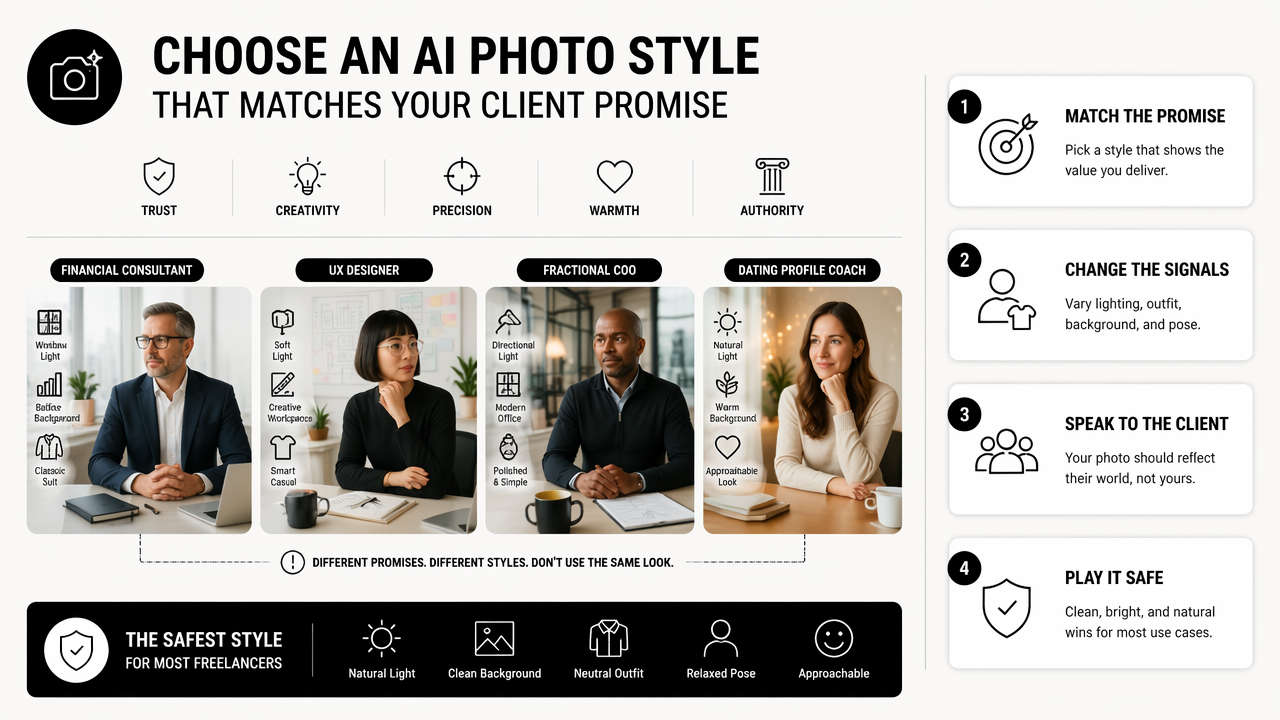
The safest style for most consultants is clean, realistic, and lightly polished. Heavy retouching can create distance, while casual snapshots may undersell expertise. The goal is not perfection; the goal is believable confidence.
Style choices by professional goal
| Professional goal | Best image style | Where it works best |
|---|---|---|
| Build trust quickly | Natural headshot, neutral background, clear eye contact | LinkedIn, proposals, email signatures |
| Signal premium expertise | Studio lighting, structured outfit, calm expression | Consulting websites, pitch decks |
| Show creative energy | Warmer background, expressive pose, brand color accents | Creator profiles, portfolio pages |
| Feel approachable | Soft lighting, relaxed posture, simple clothing | Coaching, recruiting, client calls |
| Support content marketing | Consistent face crop, bold but clean layout | Thumbnails, social posts, newsletters |
The Looktara platform is useful when visual consistency matters across formats. A consultant can create a professional portrait, then build related brand assets such as a pitch deck slide visual or a podcast cover image without making every channel feel unrelated.
Prompt details that improve professional photos
Strong prompts describe business context, not just appearance. A prompt such as "professional consultant headshot, natural light, modern office background, navy blazer, confident but approachable expression" gives the tool a clearer target than "make a good photo."
Useful prompt ingredients include:
- Role: consultant, freelancer, coach, designer, analyst, founder
- Setting: modern office, neutral studio, coworking space, outdoor urban background
- Tone: approachable, authoritative, creative, calm, energetic
- Wardrobe: blazer, knit top, collared shirt, simple dark clothing
- Use case: LinkedIn, proposal bio, website hero, webinar speaker page
A 2023 engineering education paper by Zaher, Hussain, and Altabbakh examined active learning in STEAMeD-based education, which is relevant because modern AI image work rewards iterative testing rather than one-shot output (International Journal of Engineering Pedagogy).
Which profile photo use cases matter most in 2026?
The most important profile photo use cases in 2026 are LinkedIn discovery, proposal trust, website conversion, social proof, and creator visibility. Each channel has a different job, so one single image rarely performs well everywhere.
Remote work has made visual identity more important for independent professionals because many client relationships begin without an in-person meeting. A clear headshot can reduce uncertainty before the first call, while consistent visuals make a small business look more established.
Channel-specific image plan
| Channel | Image priority | Practical recommendation |
|---|---|---|
| Recognition and trust | Tight crop, direct eye contact, simple background | |
| Website homepage | Positioning and conversion | Wider crop, brand-aligned setting, confident posture |
| Proposal deck | Authority and reassurance | Clean portrait with consistent lighting |
| X or Threads | Memorability | Strong face crop, simple color contrast |
| YouTube or shorts | Click clarity | Expressive face, readable composition, channel style |
Freelancers who publish regularly can extend a headshot into content assets. For example, a consultant sharing short client tips may pair portrait images with a shorts thumbnail generator, while a commerce consultant may need a landing page banner visual.
What strong profile images have in common
Effective professional images share a few traits across industries. The face is clear, the background does not compete, the outfit matches the service price point, and the expression feels specific to the role.
A freelancer should build a small image set rather than rely on a single hero photo:
- Primary headshot: used for LinkedIn, directories, and email avatars
- Authority portrait: used for proposals, speaking pages, and websites
- Casual professional image: used for newsletters, communities, and social posts
- Content thumbnail image: used for video, podcast, or carousel promotion
This approach gives the business visual range while keeping the personal brand recognizable.
What mistakes make AI-generated business photos look weak?
AI-generated business photos look weak when they appear too synthetic, over-retouched, inconsistent with real-world appearance, or mismatched to the service being sold. The most common problem is not that the photo looks bad; it is that the image feels less believable than the person behind the business.
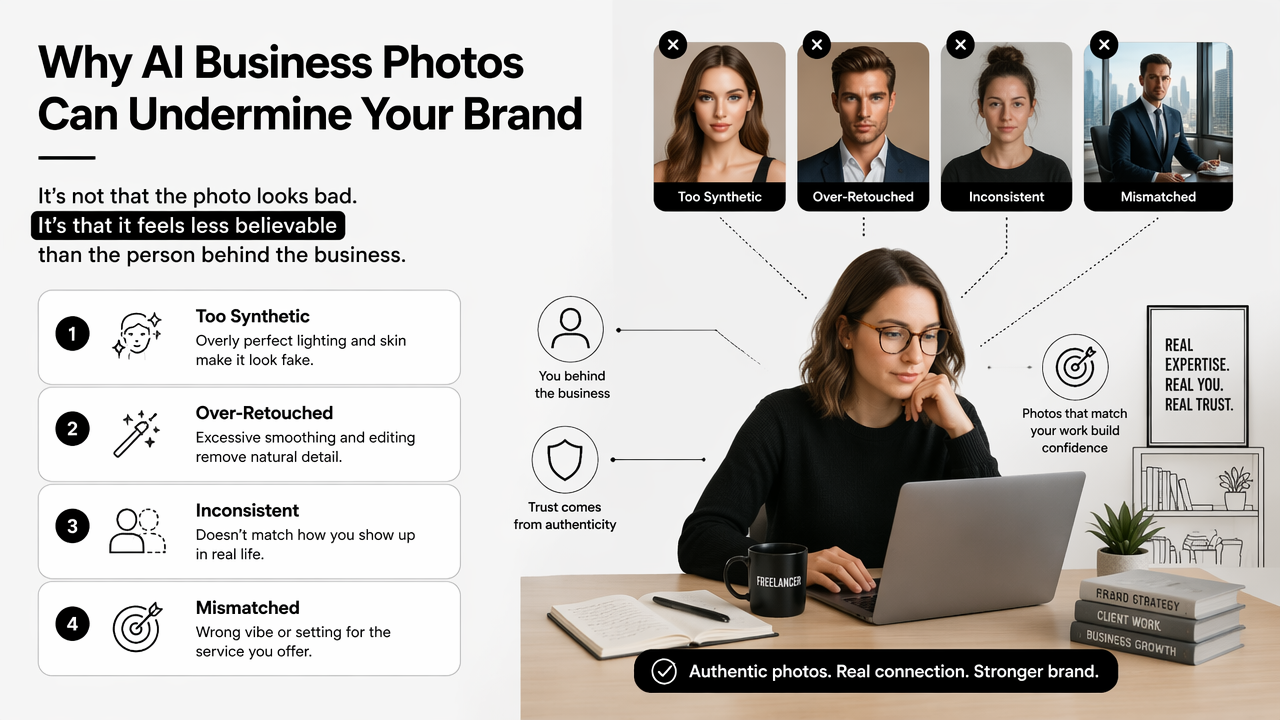
Freelancers and consultants should review every generated image as if a client were comparing it with a live video call. If the photo sets the wrong expectation, it can hurt trust instead of helping it.
Quality checklist before publishing
Use this checklist before a generated image appears on a public profile:
- Face accuracy: facial structure should match real appearance.
- Hands and accessories: remove images with distorted fingers, glasses, jewelry, or collars.
- Skin texture: avoid plastic-looking retouching.
- Background realism: office, studio, or outdoor scenes should look physically plausible.
- Brand fit: clothing and setting should match the market being served.
- Cross-channel consistency: images should look like one person, not several identities.
A professional photo should reduce friction. If an image makes a client pause and wonder whether it is real, the photo is doing too much.
Ethical and practical boundaries
Generated photos should not misrepresent credentials, workplace access, team size, or lifestyle. A solo consultant should avoid images that imply a large firm, a luxury office, or client logos that do not exist.
Transparency also matters in sensitive fields. Executive coaching, finance, health, and legal-adjacent consulting depend on trust. A realistic enhancement is usually acceptable; a fictional identity is not.
Tools such as PhotoAid, described in Wikipedia research as a digital image processing and biometric passport company founded in 2012, show how image standards can vary by purpose. A passport-style image, dating profile, LinkedIn portrait, and consulting website image all need different levels of formality.
How will AI photo generators evolve for independent professionals?
AI photo generators will move from one-off image creation toward reusable personal brand systems for independent professionals. By 2027, the stronger tools will likely focus on identity consistency, channel-specific exports, and safer controls for realism.
Marketplaces such as Fiverr, Upwork, and Vollna already show demand for AI image generation services and projects, based on current SERP results. The next step is more self-serve tooling for professionals who do not want to hire a specialist for every profile refresh.
What to expect next
The near future will favor tools that keep a person recognizable across many formats. Instead of generating a random polished portrait, better systems will support a repeatable visual identity.
Likely improvements include:
- More consistent face identity across headshots, banners, and thumbnails
- Better business templates for proposals, creator profiles, and landing pages
- Clearer style controls for tone, lighting, wardrobe, and background
- Stronger review workflows to catch unrealistic image details
- More channel sizing options for LinkedIn, YouTube, newsletters, and websites
With Looktara, independent professionals can treat profile imagery as part of a wider brand system rather than a one-time upload. More options are available on looktara.com for professionals building a visual presence across several channels.
FAQ
Can freelancers use AI-generated photos on LinkedIn?
Yes, freelancers can use AI-generated photos on LinkedIn if the image looks realistic and accurately represents the person. The safest choice is a clean headshot with natural lighting, simple clothing, and no misleading background. Images that heavily change age, facial structure, or professional context can weaken trust.
Are AI headshots better than hiring a photographer?
AI headshots are better for speed, cost control, and creating several style options quickly. A photographer may still be better for high-stakes executive branding, press features, or campaigns that require full creative direction. Many freelancers can start with AI images, then book photography later when brand needs become more complex.
How many profile photos should a consultant create?
A consultant should create at least three useful images: a primary headshot, an authority-focused website portrait, and a more relaxed social profile image. Extra versions can support speaker pages, proposal decks, YouTube thumbnails, or newsletter branding. The images should feel connected rather than identical.
What makes an AI business photo look trustworthy?
A trustworthy AI business photo looks natural, specific, and consistent with the professional service being offered. Clear eyes, realistic skin texture, simple backgrounds, and role-appropriate clothing matter more than dramatic styling. The image should match how the person would appear on a client call.
Conclusion
The best ai photo generator for freelancers and consultants is the one that creates credible, consistent images for real business moments: LinkedIn discovery, client proposals, website visits, and content publishing. A practical next step is to create three core images, review them for realism, then adapt the strongest version for each channel. For professionals ready to build that visual system, Looktara and looktara.com offer a direct path from headshot to broader brand assets.
Generated by EarlySEO.com